How it works
Sheet metal flat pattern exports
Export Onshape sheet metal flat patterns to DXF for laser cutting, plasma cutting, and CNC routing from the unfolded flat-pattern body.
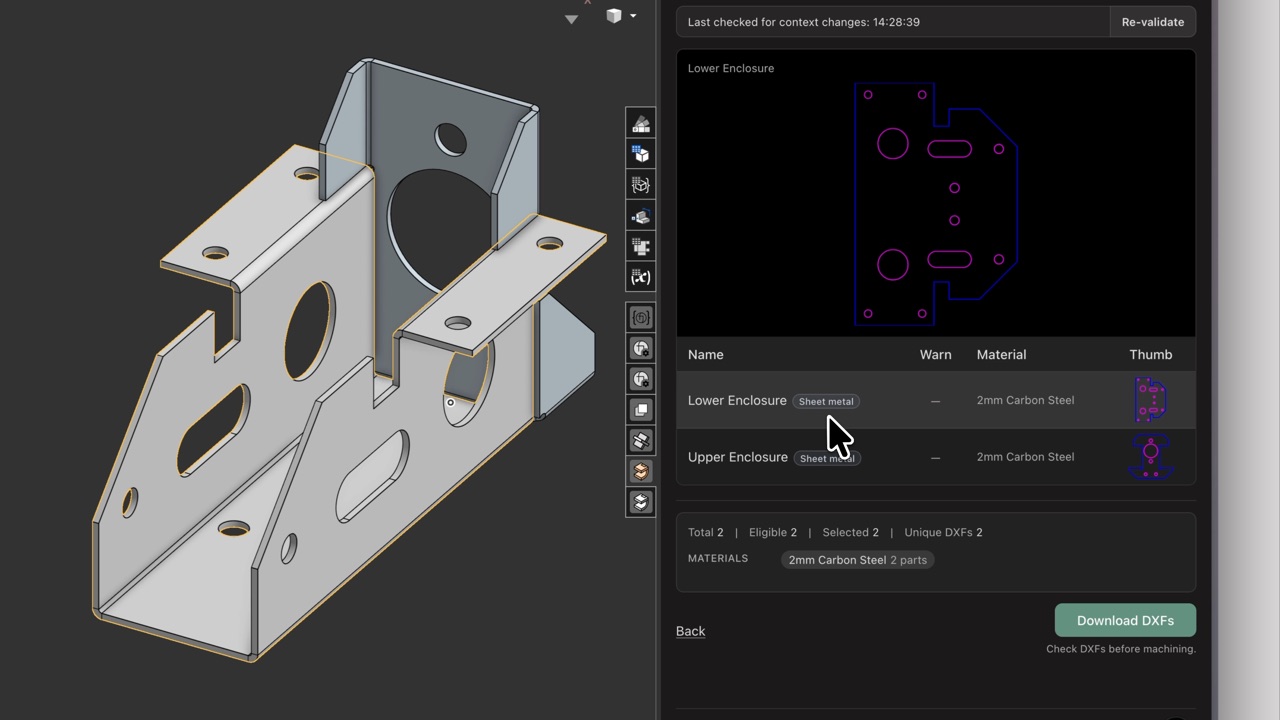
DXF Exporter exports Onshape sheet metal from the flat-pattern body, the unfolded solid Onshape creates when a sheet metal part is flattened. The downloaded DXF is the 2D cut profile for that flat pattern, not the folded 3D shape. Material and thickness still come from the part as usual.
What geometry is supported
Sheet metal validation treats the flat pattern as a through-cut plate:
- The outer boundary is exported.
- Holes and internal cut-outs that go fully through the flat solid are exported.
- Every feature must be a through cut. The front and back faces of the flattened body must match. Partial-depth pockets, bosses, form features, and similar geometry fail validation.
This differs from milled sheet-stock parts, where validation looks for parallel stock faces, pockets, V-cuts, and other layered toolpaths. See Model requirements.
A bent solid that is not an Onshape sheet metal flat pattern (for example, a lofted or swept part) will still fail validation.
DXF layers
Sheet metal flat patterns use only Cut outside and Cut inside. Pocket, V-cut, ball-cut, and depth-named layers are not used. See DXF layers and toolpath types for the full toolpath reference.