How it works
Materials and thicknesses
Assign materials in Onshape so DXF Exporter groups your download by sheet stock — material name plus measured thickness.
Sheet fabrication is organised by stock — 18mm birch plywood, 12mm birch plywood, 9mm MDF, 4mm acrylic, and so on. DXF Exporter follows the same convention: every download groups DXF files into folders named from each part’s material and thickness.
- Material name — from the Onshape material assigned to the part (the Material dialog), not a separate app setting.
- Thickness — measured from the part geometry during validation and added to that name.
- Folders — a part assigned Birch Plywood at 18mm thick lands in
18mm Birch Plywood; the same material at 12mm is a separate folder. Different materials, or the same material at different thicknesses, never share a folder. The same grouping drives the labelled combined sheet (_18mm Birch Plywood_Combined.dxf) when a folder has more than one part instance — see Download package contents.
Parts with no material assigned still export — they are grouped under a default stock name. For what else is in the download, see Download package contents.
Material assignment controls download grouping only. To set grain direction or review which face is treated as the back, use DXF Material Prep.
Thickness units
Labels follow the Onshape workspace unit (millimetres or inches). Click (mm) or (in) next to Thickness on the validation table, or next to Material on the results table, to switch for that Part Studio or Assembly. The choice is remembered for that element. Table labels, material grouping, and download folder names all use it, so the zip matches the results table.
Imperial labels are decimal inches, rounded to two decimal places — for example 19.2mm shows as 0.76″ in the table and 0.76in Birch Plywood in the zip. They are not snapped to fractions such as ¾″.
DXF coordinates, layer names, and toolpath depths stay in millimetres regardless of the display unit.
Assign a material in Onshape
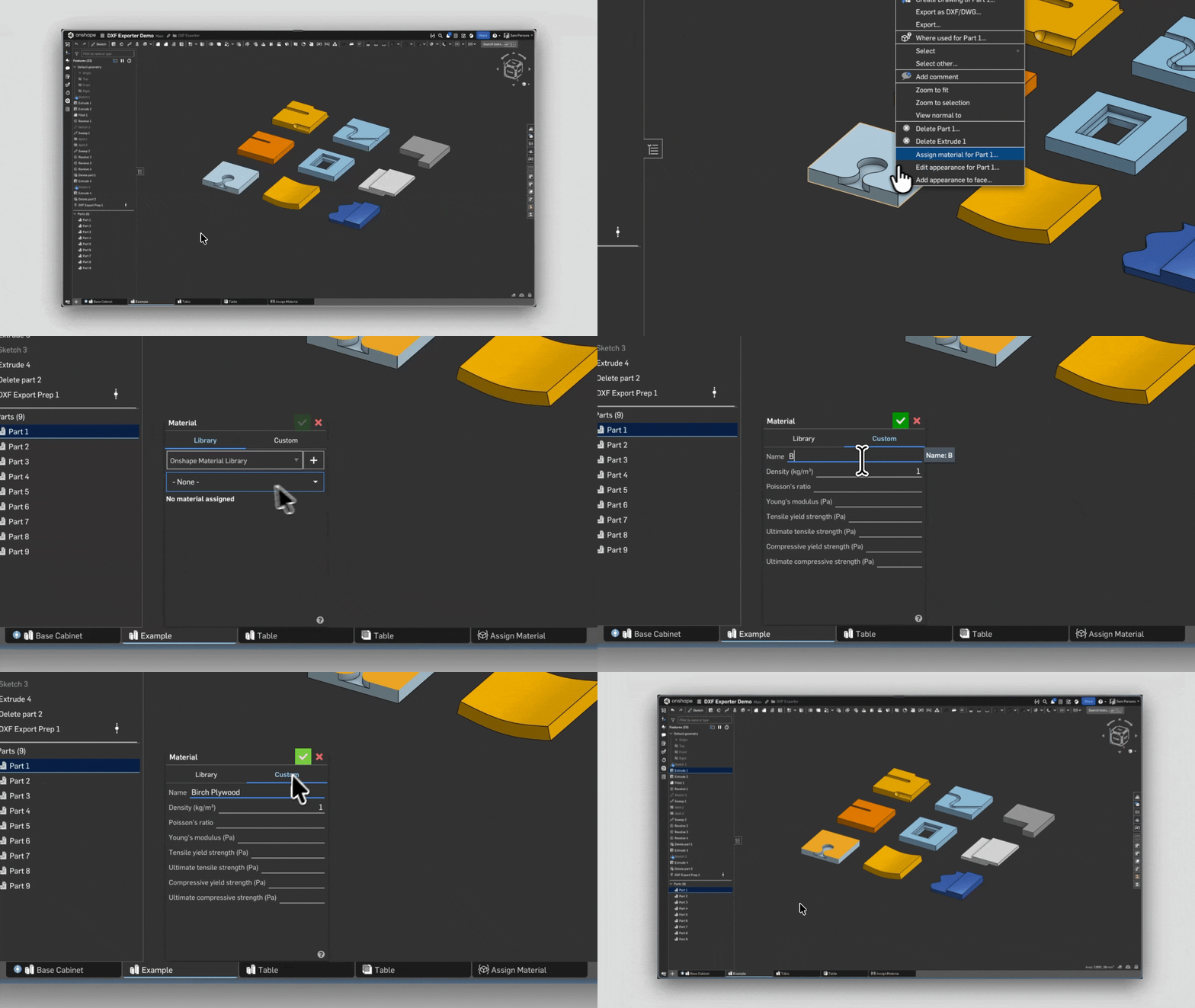
Right-click a part in the Feature list or graphics area and choose Assign material. Pick a material from a library, or use the Custom tab to enter a one-off name and properties for that part. You can assign the same material to several parts at once by selecting them first.
See Onshape: Customizing part materials for more.